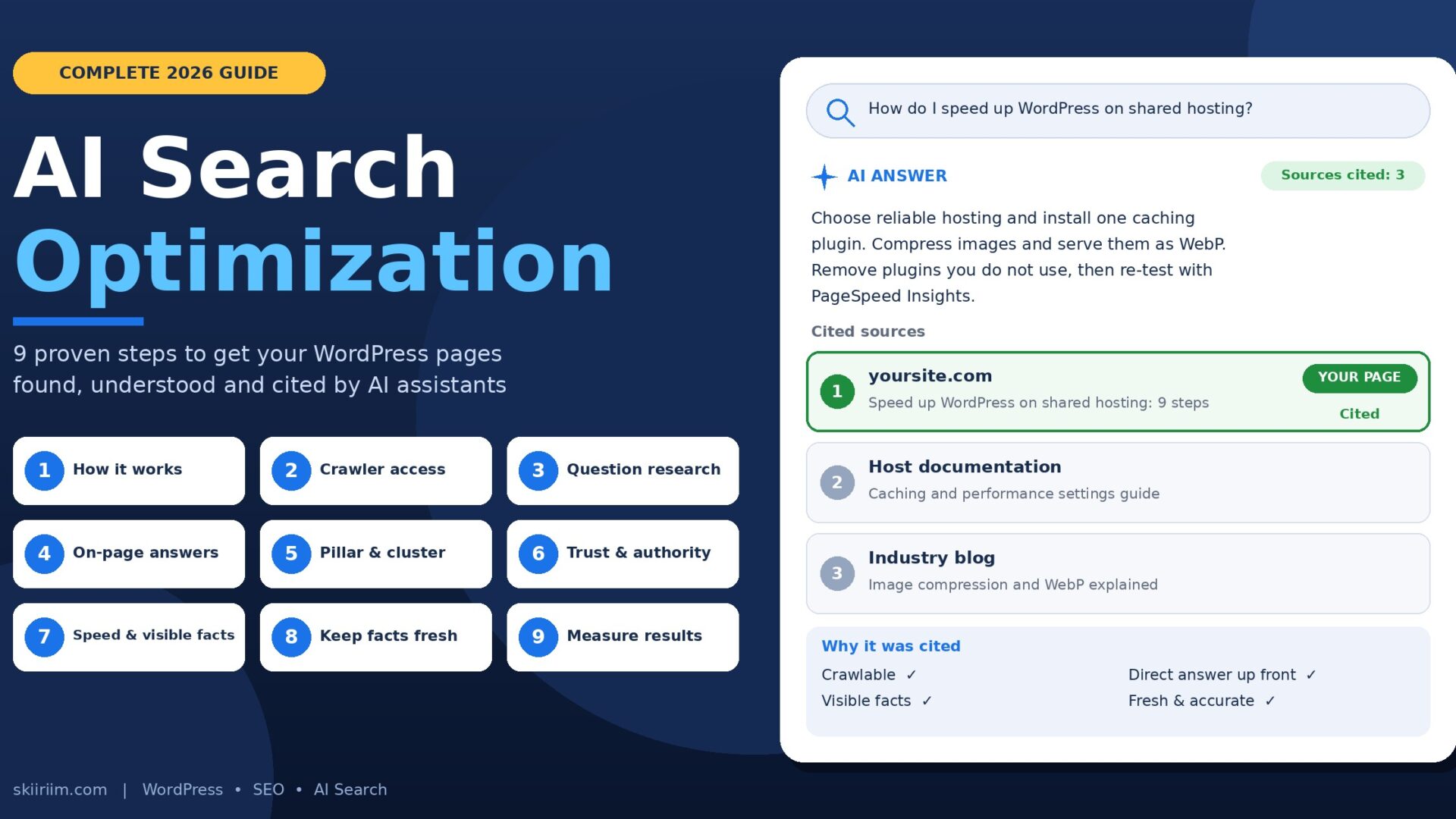

AI search optimization is the practice of improving your pages so AI assistants and AI search features can find them, understand them and cite them. If you run a WordPress site, this is now part of getting found online.
When someone asks an AI assistant a question, they usually get one written answer and a short list of sources. There is no page two. Your page is either one of those sources or it is invisible to that reader.
The good news is that the sites getting cited are not doing anything mysterious. They are reachable, focused, clearly written and accurate.
Why AI Search Optimization Matters for WordPress Owners
For twenty years the goal was to rank in a list of ten blue links. Today a growing share of questions is answered directly by AI features inside search engines and by standalone assistants.
You are now competing to be one of the sources those answers are built from.
Here is the reassuring part. Google’s own guidance explains that its AI search features build on the same core search systems as regular results.
Your pages still need to be crawlable, indexable and useful. AI search optimization does not replace SEO fundamentals. It raises the standard for clarity, accuracy and originality on top of them.
This guide covers the whole process in the order you would do the work. Where I describe results, I say plainly whether something is a documented fact, a common practice or an example. You will not find invented statistics here.
Table of Contents
Step 1: Understand How AI Search Optimization Works
The term “AI search” covers several things. Knowing them helps you plan.
AI features inside search engines. Google and Bing now show generated summaries with links to the pages they drew from.
Standalone AI assistants. Tools such as ChatGPT, Claude, Perplexity and Gemini can search the web while answering and often list their sources.
Agents and apps. Browsers and tools increasingly fetch pages for a person who asked a question.
These systems share a two-part job. They find pages relevant to a question, then pull out passages that support an answer.
The first half is ordinary search. That is why traditional SEO still matters. A page that cannot be crawled or indexed is never considered.
What AI Search Optimization Changes
- Passages matter more than pages. An assistant may use only one paragraph. If it needs the rest of the page to make sense, it is hard to use.
- Precision beats persuasion. Clear, checkable statements are easier to quote than marketing language.
- Consistency matters. If your pages disagree about a price or date, a system has to guess.
- Originality stands out. When dozens of pages say the same thing, yours needs something they lack.
The WordPress Advantage
WordPress gives you control over URLs, headings, sitemaps, redirects, speed tools and structured data. That is exactly what AI search optimization needs.
It also means one careless setting can hide your whole site. Most owners never look inside these settings, so working through this guide puts you ahead.
Step 2: Fix Crawler Access on WordPress
Nothing else matters if crawlers cannot reach your pages. Technical access is the foundation of AI search optimization.
1. Check the “Discourage Search Engines” Setting
Go to Settings → Reading and make sure “Discourage search engines from indexing this site” is unticked.
Developers often turn it on during a build and forget it at launch. It can hide a site for months.
2. Use Descriptive Permalinks
Go to Settings → Permalinks and choose “Post name”. You get readable addresses such as yoursite.com/wordpress-speed-guide instead of yoursite.com/?p=123.
Do not change the structure on a live site without redirects. It will break existing links.
3. Submit an XML Sitemap
A sitemap lists the pages you want search engines to find. WordPress creates one at yoursite.com/wp-sitemap.xml. SEO plugins create their own, often at yoursite.com/sitemap_index.xml.
Open it to confirm it loads. Then submit it in Google Search Console.
4. Review Your robots.txt File
Open yoursite.com/robots.txt. A safe starting point looks like this:
User-agent: *
Disallow: /wp-admin/
Allow: /wp-admin/admin-ajax.php

Sitemap: https://yoursite.com/wp-sitemap.xml
Watch for a blanket Disallow: / rule. Also check whether a security plugin added rules for specific bots.
A decision only you can make: many AI companies publish their own crawler names. Some owners block certain crawlers to keep content out of model training.
That is a legitimate choice. Make it on purpose, because blocking a crawler also makes that system less likely to cite you. Check each company’s current documentation, since names and behavior change.
5. Use HTTPS Everywhere
Your site should load over HTTPS with a valid certificate. Every HTTP address should redirect to the secure version.
6. Review Firewalls, Security Plugins and CDNs
Security plugins and services like Cloudflare can block unfamiliar bots automatically.
Read the firewall logs. See whether legitimate crawlers are receiving errors or challenge pages.
7. Remove Hidden Dead Ends
Redirect 404 pages to the closest relevant live page. Make sure important pages do not carry an accidental noindex tag. Keep key content out of logins and heavy scripts.
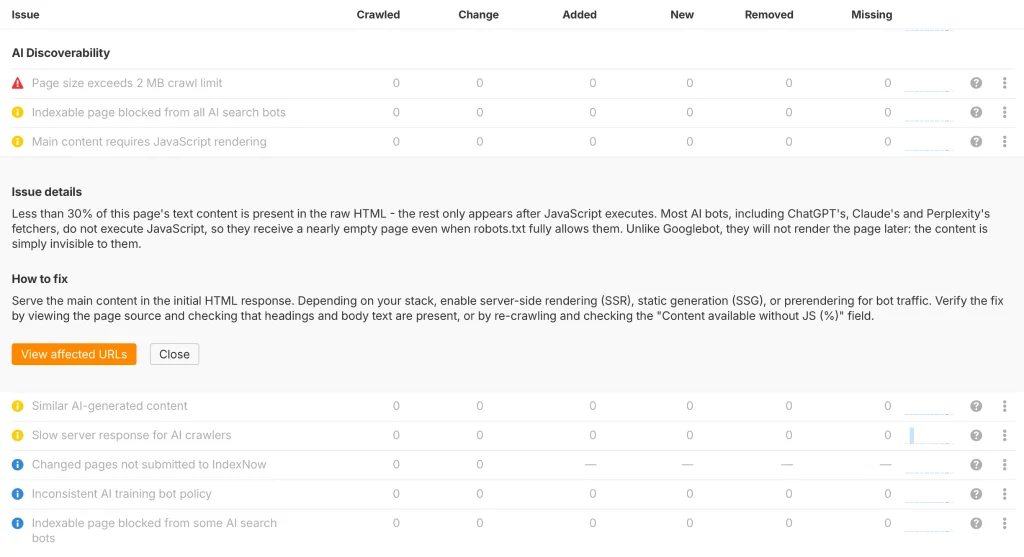
Quick self-test: open a private browser window, load a key page and view its source. If your main text appears in the raw HTML, most crawlers can read it.
Step 3: Research the Questions People Ask
Traditional keyword research asks what phrase people type. AI search optimization adds a second question: what would a person ask in a full sentence?
Assistants are conversational, so prompts are longer and more specific than old-style keywords.
Good question research finds questions where real people are asking, you can give a better answer, and the answer connects to what you offer.
The 3-Tier Question Strategy
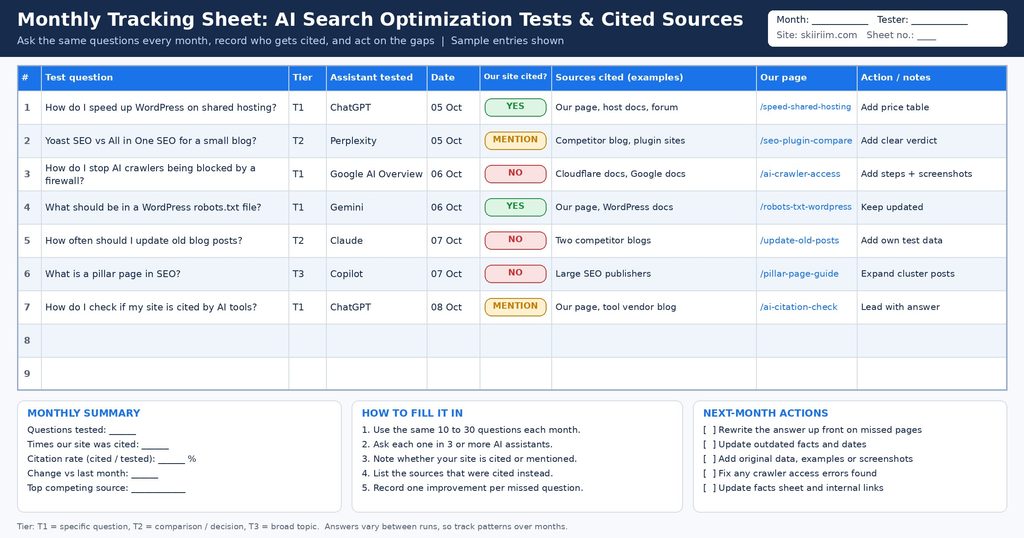
Tier 1: Specific, narrow questions. These fit a particular situation, audience or place. They are the least competitive, so a new site can realistically earn citations. Example: “How do I speed up a WordPress site on shared hosting?”
Tier 2: Comparison and decision questions. People weigh options with “X vs Y” or “best X for Z”. Example: “Yoast SEO vs All in One SEO for a small business blog.”
Tier 3: Broad topic questions. These face heavy competition from large publishers. Tackle them after you build authority. Example: “What is technical SEO?”
The winning strategy: start with Tier 1, prove you are useful, then expand.
Where to Find Real Questions
| Source | Cost | Best For |
| Google Search Console | Free | Queries that already bring people to your site |
| Google Trends | Free | Comparing interest over time and by region |
| “People also ask” and autocomplete | Free | Related questions and natural phrasing |
| Your inbox, chats and support tickets | Free | The exact wording customers use |
| Paid SEO suites such as Semrush or Ahrefs | Paid | Volume estimates and tracking at scale |
The best source on that list is free: your own customers. If three people asked you the same question this month, thousands more are asking it too.
Build a spreadsheet with the question, its tier, the page that answers it and its status. Aim for 20 to 30 questions to start.
Step 4: Apply On-Page AI Search Optimization
On-page work is what you control inside each post. These five habits make a page easier for readers and machines to understand.
Give Each Page One Clear Job
A page that answers ten questions rarely becomes the best answer to any of them.
Suppose you want to be cited for “how to speed up a WordPress site on shared hosting”. A dedicated post with that wording in the title and opening paragraph is a far closer match than one paragraph buried in a general tips article.
Write a Title and Description That Match the Question
Title formula: topic + clarifying detail + brand.
Example: “How to Speed Up WordPress on Shared Hosting (2026 Guide) | SKIIRIIM”
Put the main topic near the start and aim for 50 to 60 characters. Describe what the page really delivers.
The meta description does not directly decide rankings, but it influences clicks. Write one or two honest sentences of about 150 to 160 characters.
Lead With the Answer
“Bottom line up front” means stating the conclusion in the first sentence or two of each section, then supporting it.
Buried: “There are many things to think about with images, and over the years site owners have tried lots of approaches…”
Direct: “Compress every image before uploading it and serve it in WebP format. For most blogs, this removes the largest chunk of unnecessary page weight.”
The direct version helps a hurried reader. It also gives an AI system a clean passage to quote.
Write Self-Contained Sections
Use one H1 per page, H2s for main sections and H3s for subsections. Never skip levels. Phrase headings the way a person would ask the question.
Make each section work on its own. Avoid “as mentioned above” or a bare “this plugin”. Name the thing.
Be specific. “A good caching plugin” says little. “LiteSpeed Cache on LiteSpeed hosts, or WP Rocket elsewhere” gives something concrete to quote.
Link Internally With Purpose
Internal links guide readers and crawlers between related pages. Link from strong posts to newer ones, using descriptive anchor text.
For example, read our WordPress SEO guide for the wider fundamentals, and our WordPress speed optimization checklist for performance fixes.
A note on keyword density: there is no magic percentage. Write naturally and vary your wording. Stuffing keywords makes text worse and gains nothing.
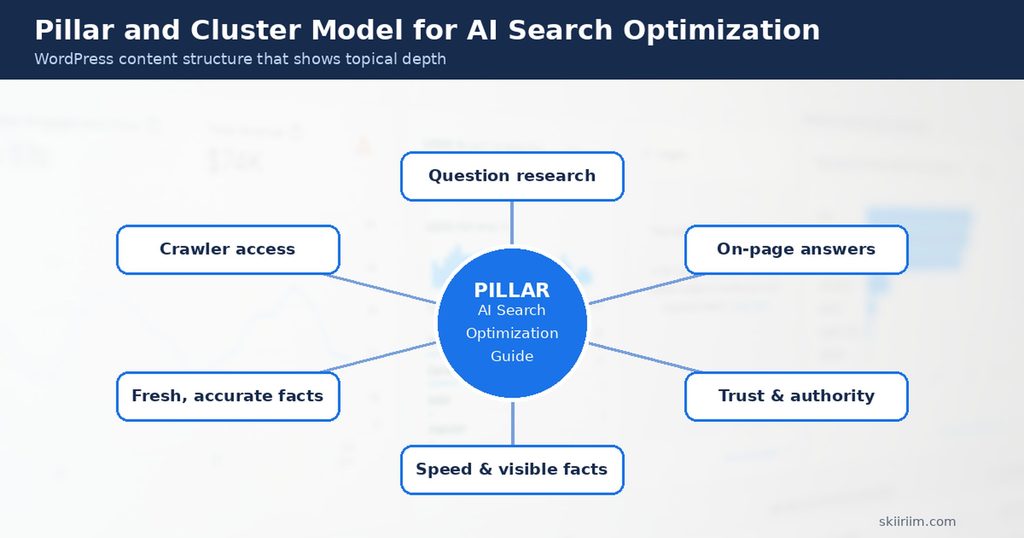
Step 5: Build Pillar and Cluster Content
The pillar-cluster model organizes a site around topics instead of isolated posts. It suits AI search optimization because it shows depth.
- Pillar page: a comprehensive guide to the whole topic.
- Cluster posts: focused articles that each answer one question in depth.
- Internal links: every cluster post links up to the pillar, and the pillar links out to each one.
Example for a WordPress maintenance business. The pillar is “The Complete Guide to WordPress Maintenance”. The clusters could be:
- How often should you update WordPress plugins?
- How to back up a WordPress site and test the backup
- How to speed up WordPress on shared hosting
- How to check whether your WordPress site was hacked
- WordPress maintenance costs: what to expect
Each cluster post targets a narrow question, which is the kind of page that tends to match specific prompts.
Dedicated pages also work for use cases. A page called “WordPress maintenance for schools” matches a narrow question better than a general services page.
Choose depth over volume. If a page could be written in ten minutes from other people’s articles, it will not stand out.
Step 6: Build Authority and Trust
Systems that generate answers need sources they can rely on. You cannot force trust, but you can make it visible.
Show Who Is Behind the Content
- Add a real author name and short bio to your posts.
- Create a clear About page and a contact page with real details.
- Explain how you know what you write about.
Back Up Claims
Link to the original source of every fact or statistic, ideally the company or researcher who produced it. If you cannot verify a number, leave it out.
Publish Original Material
This is the strongest lever for AI search optimization, and the one most sites skip. Options include:
- Results of your own tests, with the method explained
- Screenshots and data from your own sites
- A small survey of your customers or community
- Free checklists, templates or calculators
- Honest lessons from your own mistakes
Original material gives others a reason to link to you. It also gives AI systems something they cannot get from a hundred near-identical articles.
Earn Links Ethically
Links from respected sites still help. You can earn them without an agency by publishing useful resources, writing guest articles with real value, joining reputable directories and helping in niche communities.
Avoid buying links, bulk link swaps and low-quality directory blasts.
Step 7: Improve Speed and Visible Facts
Fast pages are better for readers, and Google measures experience through Core Web Vitals. Current “good” thresholds are:
- LCP (Largest Contentful Paint): 2.5 seconds or less
- INP (Interaction to Next Paint): 200 milliseconds or less. INP replaced the older FID measure.
- CLS (Cumulative Layout Shift): 0.1 or less
Test your pages free with Google PageSpeed Insights.
The WordPress speed checklist:
- Choose reliable hosting suited to your traffic.
- Install one good caching plugin and configure it properly.
- Compress images and use formats such as WebP.
- Use a content delivery network if your audience is spread out.
- Remove plugins and themes you do not use.
Put Important Facts in Visible Text
Do not leave key information where a crawler might miss it. If prices, features or hours appear only in an image, slider or chart, also write them as normal text.
Structured data still helps search engines, and SEO plugins add the basics. Treat it as a supplement, not a replacement for visible text.
A quick check: select all the text on a page and paste it into a plain notepad. Whatever is missing is what a text-only reader will miss.
Step 8: Keep Your Facts Fresh
Outdated or contradictory pages are the easiest way to get misquoted. If your pricing page, an old post and your footer all disagree, a system has to guess.
Build a facts sheet. Use one document with one claim per line, each short enough to confirm in seconds.
Include services, current prices or ranges, areas served, contact details, opening hours and any figures you publish regularly.
Check every new post against it before publishing. Review older posts every quarter.
Update honestly. Change the content and the visible “last updated” date together. Changing only the date helps nobody.
Step 9: Measure Your AI Search Optimization Results
You can learn a lot without paid software. Follow this monthly routine.
- Ask the assistants. Put your target questions into a few AI assistants and note which sources are cited. Answers vary between runs, so look for patterns.
- Check Search Console. Watch impressions, clicks and queries for improved pages.
- Read your server or CDN logs. They show which crawlers visit and whether any get errors.
- Study the winners. Open pages cited instead of yours and see what they offer that you do not.
Paid visibility tools can automate parts of this, but a monthly spreadsheet is enough to begin.
How to Document Your Own Case Study
Real evidence beats borrowed claims. Follow these steps for six to twelve months:
- Record a baseline before changing anything.
- Write down exactly what you change, with dates.
- Change a small set of pages first and leave similar ones untouched for comparison.
- Re-measure on a schedule using the same questions.
- Report honestly, including what did not work.
AI Search Optimization Checklist for Every New Post
Use this short checklist before you publish any page. It turns the nine steps into a routine you can repeat in ten minutes.
- ☐ The page answers one clear question, and the question appears in the title and first paragraph.
- ☐ The first sentence of each section states the answer before explaining it.
- ☐ Every heading makes sense to someone who lands directly on that section.
- ☐ Prices, dates, names and figures are written as visible text and match your facts sheet.
- ☐ Every statistic links to its original source, or it has been removed.
- ☐ The page contains something original: a test, an example, a screenshot or a clear opinion.
- ☐ The page links to two or three related posts on your own site.
- ☐ The author name, bio and last updated date are visible.
- ☐ The page loads quickly on a mobile connection.
- ☐ The page is not blocked by robots.txt, a noindex tag or a firewall rule.
Make this checklist part of your publishing workflow. Teams that treat AI search optimization as a habit, not a one-off project, keep their pages accurate as products, prices and advice change.
Save it as a template in WordPress or in a shared document. Each time you update an old post, run the same list again. Consistent AI search optimization across your whole site matters more than perfection on a single page.
5 AI Search Optimization Mistakes to Avoid
Mistake 1: Accidentally Blocking Crawlers
A forgotten setting, an aggressive security plugin or a broad robots.txt rule can hide your site silently.
Fix: work through the seven checks in Step 2.
Mistake 2: Publishing Generic Content
Summaries of other people’s articles give a system no reason to prefer yours.
Fix: add original data, experience or a clear position to every important page.
Mistake 3: Burying the Answer
Long introductions and vague headings hide the useful part.
Fix: lead with the answer and write question-style headings.
Mistake 4: Leaving Outdated Information Live
Old prices and discontinued services create confusion.
Fix: keep a facts sheet and review pages quarterly.
Mistake 5: Chasing Tricks Instead of Quality
Keyword stuffing, unreviewed mass-produced text, fake statistics and purchased links damage trust.
Fix: use AI to help draft and edit if you like, but verify every fact and add your own expertise.
Your 12-Month AI Search Optimization Roadmap
📅 Months 1-2: Foundation
- ☐ Complete the seven crawler access checks
- ☐ Install one SEO plugin
- ☐ Set up Search Console and Bing Webmaster Tools
- ☐ Build a list of 20 to 30 questions
- ☐ Record your baseline and create a facts sheet
📅 Months 3-4: Content Fixes
- ☐ Rework your top 5 to 10 pages
- ☐ Add direct answers, clear headings and visible facts
- ☐ Fix contradictions and outdated details
- ☐ Improve internal linking
📅 Months 5-7: Structure and Speed
- ☐ Map your pillar-cluster structure
- ☐ Publish one or two cluster posts each month
- ☐ Work through the speed checklist
- ☐ Add author bios and improve About and Contact pages
📅 Months 8-10: Authority
- ☐ Publish one piece of original research or a free resource
- ☐ Begin honest outreach
- ☐ Re-run your assistant tests and compare with your baseline
📅 Months 11-12: Review
- ☐ Review a year of data
- ☐ Write up your own case study
- ☐ Update or retire outdated posts
- ☐ Plan next year’s Tier 2 and Tier 3 questions
FAQ About AI Search Optimization
Do I need a special plugin for AI search optimization?
No. A standard SEO plugin, a well-built theme and good writing cover most of it. Be cautious of any tool that guarantees AI citations, because nobody controls what these systems show.
Does traditional SEO still matter?
Yes. Pages still need to be crawlable, indexable and useful. AI search optimization builds on that foundation.
How long until I see results?
It depends on your niche, competition and how much needs fixing. AI answers can change from day to day, so measure over months, not days.
Should I block AI crawlers?
That is your decision. Blocking may protect content from training use, but it can reduce your chance of being cited. Review each company’s documentation and choose deliberately.
Can I use AI to write my posts?
You can use it as a drafting and editing assistant. Publishing unreviewed, generic text is risky. Add your own experience and verify every fact.
Do I need an agency?
Not necessarily. You can do these steps in-house over time. Avoid anyone promising guaranteed rankings or citations.
Conclusion: Start Your AI Search Optimization Today
AI search optimization rewards the same qualities good readers do. Pages that are reachable, focused, clearly written and truthful have the best chance of being used.
Start with the access checks in Step 2. Choose three pages to rework using Step 4. Write your facts sheet and begin your monthly test.
Small, consistent improvements beat any shortcut. In a year, you will have real results of your own to share.
📚 Resources Mentioned
- Google Search Central: AI features and your website – Free official guidance.
- Google Search Console – Free. Track queries, clicks and indexing.
- Google PageSpeed Insights – Free. Test speed and Core Web Vitals.
- Google Trends – Free. Compare interest in topics.
- Yoast SEO – Free and premium SEO plugin.
- Cloudflare – CDN, security and crawler controls.